熬夜写的VPS小鸡流量统计网页 __2023年7月12日 __3条评论 __306次阅读 __0人点赞 __Tao_Qi 说明 适用于RN、greencloud、vir、ddp等使用solusVM控制面板商家
程序直接调用的solusVM面板的API,代码参考网上现存的,用GPT美化了下
这样就方便不用进每个小鸡面板分别查看了~
预览 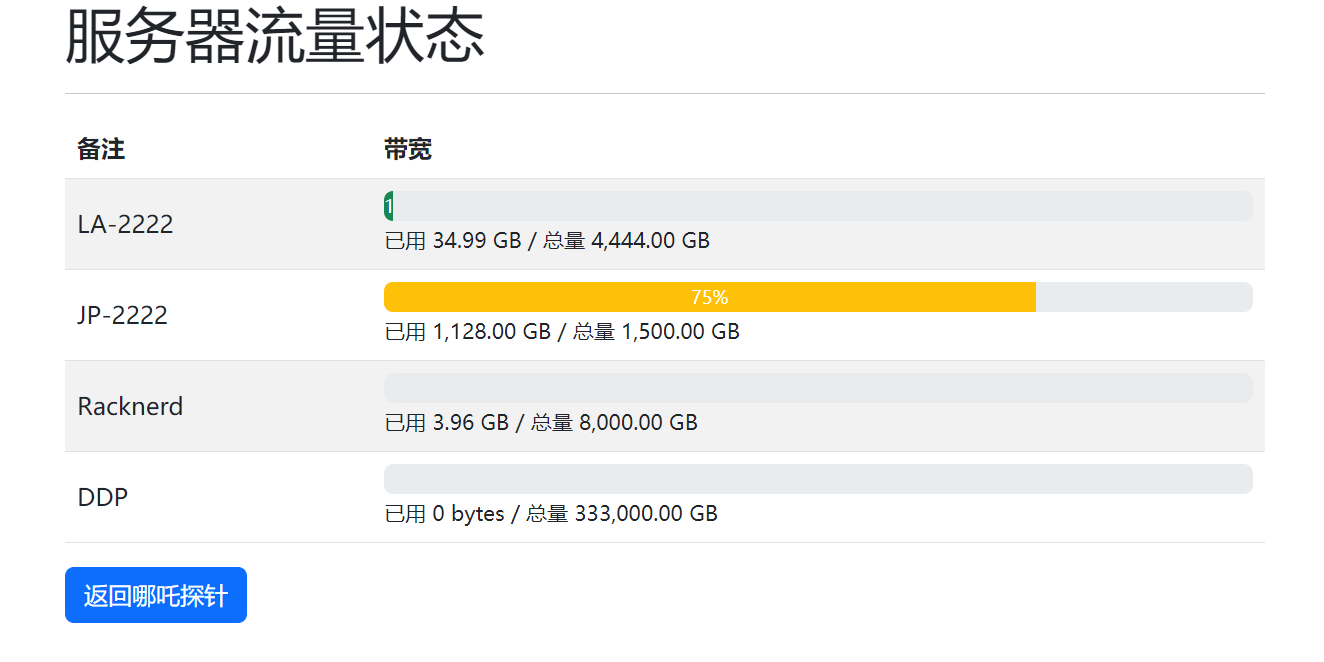 使用方法 进入面板获取API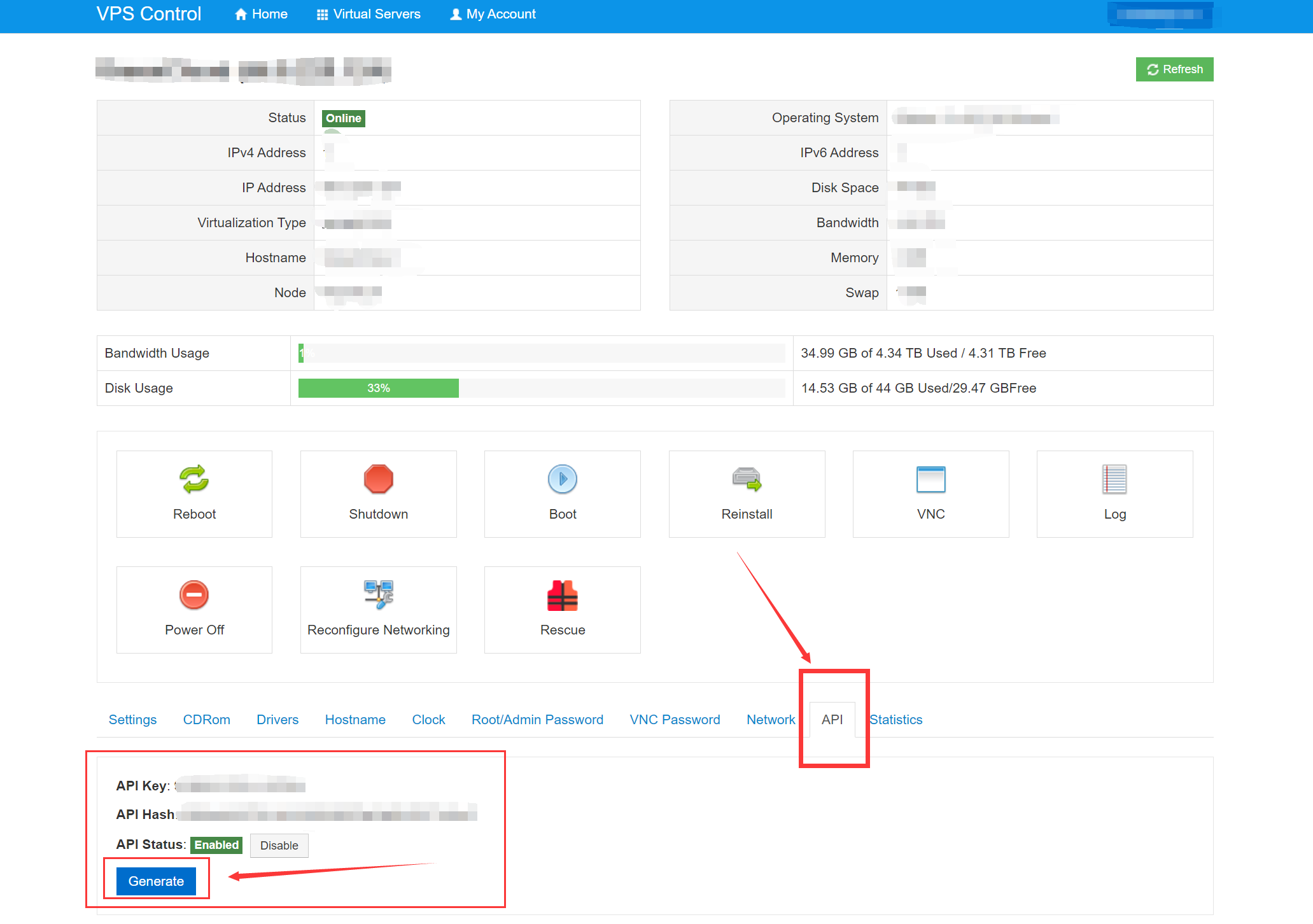
在30行处进行替换修改API,https://manage.xxxxxxx.com/修改为面板管理地址,注意格式不要动!网址前面有https后面有斜杠/
在157行修改为自己的哪吒探针地址
注意保护好自己的API,有重装小鸡系统权限! 如果是多账号不建议使用:
@zybep #4 发布于2023/7/12 11:27:16,编辑于2023/7/12 11:30:09
前排警告,会触发vir多号警报,其他家也可以通过相同的手段查到多号
代码
[code]
  服务器流量状态


    .table {
      width: 100%;
    }

    .table th,
    .table td {
      vertical-align: middle;
    }

    .progress {
      height: 20px;
    }


    服务器流量状态


* * *


    = 1 << 30) || $unit == "GB")
        return number_format($size / (1 <= 1 << 20) || $unit == "MB")
        return number_format($size / (1 <= 1 << 10) || $unit == "KB")
        return number_format($size / (1 << 10), 2) . " KB";
      return number_format($size) . " bytes";
    }

    function post($keys, $hashs, $naserurls, $beizhu)
    {

      $postfields["key"] = $keys;
      $postfields["hash"] = $hashs;
      $postfields["action"] = "info";
      $masterurl = $naserurls;
      $postfields["status"] = "true";
      $postfields["hdd"] = "true";
      $postfields["mem"] = "true";
      $postfields["bw"] = "true";

      $ch = curl_init();

      curl_setopt($ch, CURLOPT_URL, "{$masterurl}/api/client/command.php");
      curl_setopt($ch, CURLOPT_POST, 1);
      curl_setopt($ch, CURLOPT_HEADER, 0);
      curl_setopt($ch, CURLOPT_RETURNTRANSFER, 1);
      curl_setopt($ch, CURLOPT_POSTFIELDS, $postfields);
      curl_setopt($ch, CURLOPT_HTTPHEADER, array("Expect: "));
      curl_setopt($ch, CURLOPT_SSL_VERIFYPEER, 0);

      // Execute the request

      $data = curl_exec($ch);

      $code = curl_getinfo($ch, CURLINFO_HTTP_CODE);

      if ($code != 200) {
        $return['error'] = 1;

        if ($code == 405) {
          $return['message'] = "Incorrect API credentials.";
          return $return;
        }

        $return['message'] = "Invalid status code.";

        return $return;
      }

      // Close the Curl handle

      curl_close($ch);

      if (!$data) {
        $return['error'] = 1;
        $return['message'] = "Error connecting to API.";

        return $return;
      }

      // Extract the data

      preg_match_all('/([^<] )/i', $data, $match);

      $result = array();
      $result['bz'] = $beizhu;
      foreach ($match[1] as $x => $y) {
        $result[$y] = $match[2][$x];
      }
      //获取出错
      if ($result['status'] == "error") {
        $result['error'] = 1;
        $result['message'] = $result['statusmsg'];

        return $result;
      }
      //获取正常
      $result['error'] = 0;

      $result['hdd'] = explode(",", $result['hdd']);
      $result['mem'] = explode(",", $result['mem']);
      $result['bw'] = explode(",", $result['bw']);
      return $result;
    }

    ?>


          备注
          | 带宽

---|---


            |

                <div class="progress-bar = 90) ? 'bg-danger' : (($key['bw'][3] >= 75) ? 'bg-warning' : 'bg-success'); ?>" role="progressbar" style="width: %;" aria-valuenow="" aria-valuemin="0" aria-valuemax="100">
                  %


              已用  / 总量


    [返回哪吒探针](<https://status.xxxxxx.xyz>)
[/code]
本作品采用 知识共享署名-相同方式共享 4.0 国际许可协议 __No Tag 最后编辑:2023年7月12日
本文著作权归作者 [ doudoudoubao ] 享有,未经作者书面授权,禁止转载,封面图片来源于 [ 互联网 ] ,本文仅供个人学习、研究和欣赏使用。如有异议,请联系博主及时处理。