【Docker部署Nagios 一】通过docker安装并使用snmpd对客户端进行监控 1 __2023年7月29日 __3条评论 __270次阅读 __0人点赞 __Tao_Qi 之前一直用编译的方式安装nagios,最近想把几个常用的运维工具整理在一起,于是就想到了用docker的方法来运行,同时可以有效的进行环境隔离.依旧是很乱的排版,请多多见谅.有不妥的地方欢迎指出.后面可能会写一篇比较短的nagios通过smtp实现宕机告警的操作步骤. 如果论坛有对ganglia这个比较老的监控工具有兴趣的话,我可以写一篇ganglia nagios的集成,大概就是ganglia负责收集客户端数据并制图,nagios通过特定插件监控ganglia所收集的各项指标,并根据你设置的阈值进行告警. 有兴趣的可以去GitHub看一下:https://github.com/ganglia/ganglia-web/wiki/Nagios-Integration 准备工作 为后续操作能够易懂,我们假设下面两个ip分别表示服务端和客户端
[code]
服务端ip:192.168.1.1
客户端ip:192.168.1.2
[/code]
服务端 首先创建三个配置目录 mkdir /etc/nagios && mkdir /etc/nagios/etc/ && mkdir /etc/nagios/var/ && mkdir /etc/nagios/plugins 拉取Nagios Docker项目 docker pull manios/nagios
[code]
docker run -d \
--name nagios \
-e NAGIOSADMIN_USER="Nagios" \ # 设置你的nagios web登录用户名
-e NAGIOSADMIN_PASS="nagiosadmin" \ # 设置你的nagios web登录用户密码
-h master \ # 设置容器hostname
-v /etc/nagios/etc/:/opt/nagios/etc/ \
-v /etc/nagios/var/:/opt/nagios/var/ \
-v /etc/ssmtp/ssmtp.conf:/etc/ssmtp/ssmtp.conf \ # 需要提前安装ssmtp ( apt install ssmtp -y )
-v /etc/nagios/plugins:/opt/Custom-Nagios-Plugins \
-p 0.0.0.0:8080:80 \
manios/nagios:latest
[/code]
浏览器打开http://192.168.1.1:8080/ 输入你设置的账号和密码即可访问Nagios Web页面 访问Nagios进入Hosts提示报错
It appears as though you do not have permission to view information for any of the hosts you requested... If you believe this is an error, check the HTTP server authentication requirements for accessing this CGI and check the authorization options in your CGI configuration file.
原因 : 认证用户不正确 开启认证:认证的用户必须是 cgi.cfg 配置文件里有的 默认是 nagiosadmin,如果你新建的其他用户,需要添加进去,多用户用逗号分开 添加方法:nano /etc/nagios/etc/cgi.cfg 在nagiosadmin 后面添加你所设置的用户名(Nagios),如下方所示
[code]
authorized_for_configuration_information=nagiosadmin,Nagios
authorized_for_system_commands=nagiosadmin,Nagios
authorized_for_all_services=nagiosadmin,Nagios
authorized_for_all_hosts=nagiosadmin,Nagios
authorized_for_all_service_commands=nagiosadmin,Nagios
authorized_for_all_host_commands=nagiosadmin,Nagios
authorized_for_system_information=nagiosadmin,Nagios
authorized_for_configuration_information=nagiosadmin,Nagios
authorized_for_system_commands=nagiosadmin,Nagios
authorized_for_all_services=nagiosadmin,Nagios
authorized_for_all_hosts=nagiosadmin,Nagios
authorized_for_all_service_commands=nagiosadmin,Nagios
authorized_for_all_host_commands=nagiosadmin,Nagios
[/code]
重启Nagios docker restart nagios 添加客户端 服务端 在服务端中编辑hosts 添加 192.168.1.2 slave-1,使服务端的hosts内容看起来像下面所示
[code]
192.168.1.1 master
192.168.1.2 slave-1
[/code]
修改nagios配置文件,添加客户端配置存放文件夹 mkdir /etc/nagios/etc/objects/slave/ && cd /etc/nagios/etc/ && nano nagios.cfg 在 # Definitions for monitoring the local (Linux) host 下面添加一行配置文件存放地址 cfg_dir=/etc/nagios/etc/objects/slave/ 如下方所示
[code]
# Definitions for monitoring the local (Linux) host

cfg_file=/opt/nagios/etc/objects/localhost.cfg
cfg_dir=/opt/nagios/etc/objects/slave/
[/code]
创建客户端配置文件 nano /etc/nagios/etc/objects/slave/slave-1.cfg 并添加以下代码
[code]
define host {
        use                          linux-server
        host_name                    slave-1
        alias                        slave-1
        address                      192.168.1.2
        register                     1
}

define service {
    use                     generic-service
    host_name               slave-1
    service_description     SNMP Uptime
    check_command           check_snmp!-H 192.168.1.2 -C slave -o sysUpTime.0 -r 3 -m RFC1213-MIB
    max_check_attempts      5
    check_interval          1
    retry_interval          1
    check_period            24x7
    contact_groups          admins
    notification_interval   1
    notification_period     24x7
    notifications_enabled   1
}
[/code]
客户端 安装snmpd并修改配置 apt install snmpd -y && nano /etc/snmp/snmpd.conf 其中需要修改的参数为
[code]
sysLocation slave-1 # 系统地址
sysContact master # 联系人

agentaddress udp:161 # SNMP端口

# system   hrSystem groups only

view systemonly included .1.3.6.1.2.1.1
view systemonly included .1.3.6.1.2.1.25.1
view systemonly included .1 # 添加这一行代码

# Read-only access to everyone to the systemonly view

rocommunity slave default -V systemonly # 团队名称 slave
rocommunity6 slave default -V systemonly # 团队名称 slave
[/code]
根据自己的需求进行修改完成,保存并重启服务 /etc/init.d/snmpd restart 服务端 使用nagios.cfg确认 /etc/nagios/etc/objects/slave/slave-1.cfg 配置无误 具体使用方法 docker exec -it nagios bin/nagios -v etc/nagios.cfg 如果配置无误就会显示
[code]
Nagios Core 4.4.9
Copyright (c) 2009-present Nagios Core Development Team and Community Contributors
Copyright (c) 1999-2009 Ethan Galstad
Last Modified: 2022-11-16
License: GPL

Website: https://www.nagios.org
Reading configuration data...
Read main config file okay...
Read object config files okay...

Running pre-flight check on configuration data...

Checking objects...
Checked 9 services.
Checked 2 hosts.
Checked 1 host groups.
Checked 0 service groups.
Checked 1 contacts.
Checked 1 contact groups.
Checked 24 commands.
Checked 5 time periods.
Checked 0 host escalations.
Checked 0 service escalations.
Checking for circular paths...
Checked 2 hosts
Checked 0 service dependencies
Checked 0 host dependencies
Checked 5 timeperiods
Checking global event handlers...
Checking obsessive compulsive processor commands...
Checking misc settings...

Total Warnings: 0
Total Errors: 0

Things look okay - No serious problems were detected during the pre-flight check
[/code]
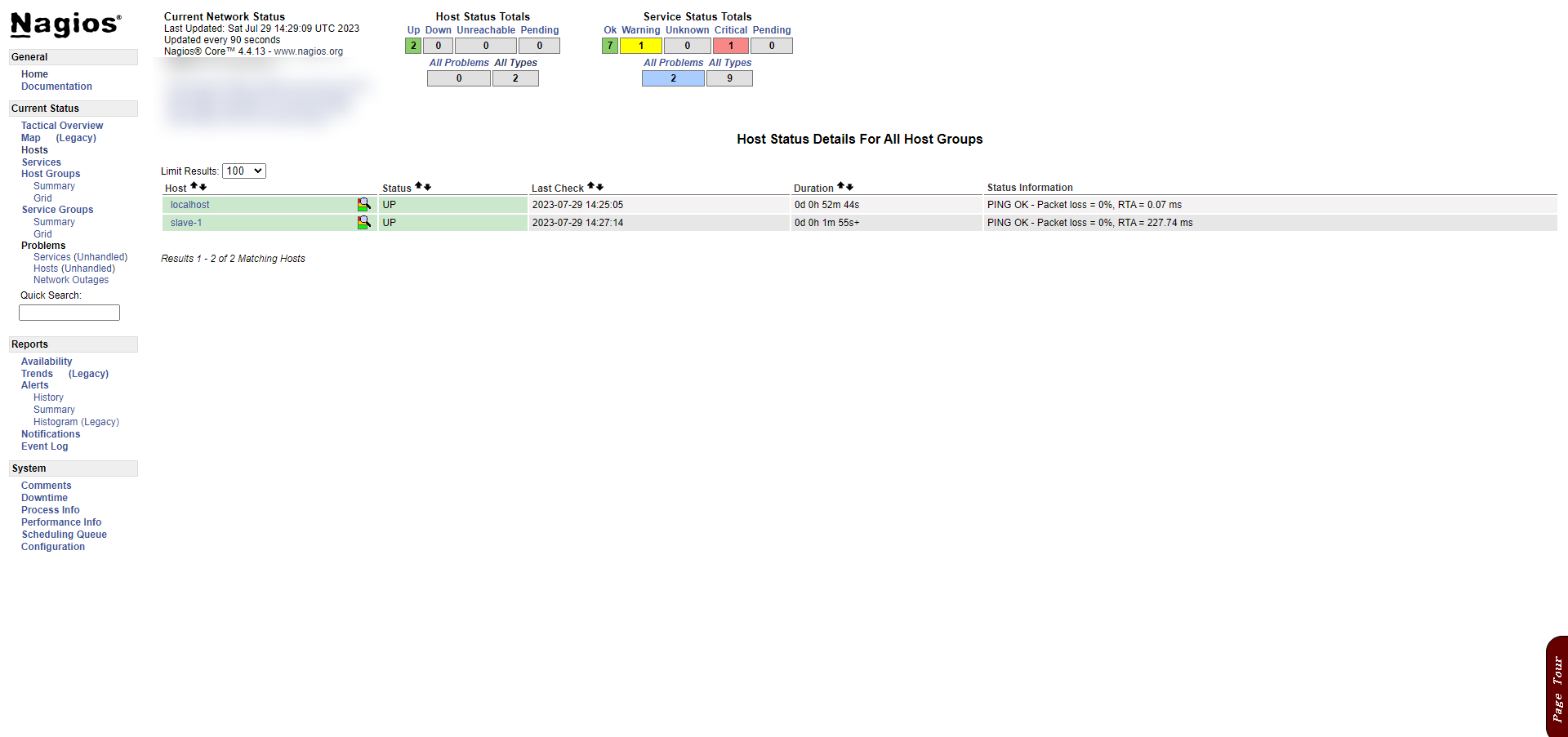系列整理[【Docker部署Nagios一】通过docker安装并使用snmpd对客户端进行监控](http://127.0.0.1:5001/post-16238-1)[【Docker部署Nagios二】通过snmpd监控客户端数据以及配置smtp邮件告警](http://127.0.0.1:5001/post-17261-1)本作品采用[知识共享署名-相同方式共享4.0国际许可协议](http://creativecommons.org/licenses/by-sa/4.0/)进行许可[__点赞](javascript:;)[__分享](javascript:;)[__](javascript:;)[__](javascript:;)[__](javascript:;)[__](javascript:;)[__](javascript:;)[__打开微信“扫一扫”,打开网页后点击屏幕右上角分享按钮](javascript:;)__NoTag最后编辑:2023年7月29日[上一篇](https://www.5yyx.com/?p=3659adfefdbb7c0c305e7cd1ae9e6040032513教程adfefdbb7c0c305e7cd1ae9e6040032514Cloudflare绑卡可订阅R2、zerotrust2)[下一篇](https://www.5yyx.com/?p=2985](https://hub.docker.com/r/manios/nagios解决访问报错:https://www.cnblogs.com/5201351/p/4330204.html排名不分先后,感谢.效果图系列整理[【Docker部署Nagios一】通过docker安装并使用snmpd对客户端进行监控](http://127.0.0.1:5001/post-16238-1)[【Docker部署Nagios二】通过snmpd监控客户端数据以及配置smtp邮件告警](http://127.0.0.1:5001/post-17261-1)本作品采用[知识共享署名-相同方式共享4.0国际许可协议](http://creativecommons.org/licenses/by-sa/4.0/)进行许可[__点赞](javascript:;)[__分享](javascript:;)[__](javascript:;)[__](javascript:;)[__](javascript:;)[__](javascript:;)[__](javascript:;)[__打开微信“扫一扫”,打开网页后点击屏幕右上角分享按钮](javascript:;)__NoTag最后编辑:2023年7月29日[上一篇](https://www.5yyx.com/?p=3659adfefdbb7c0c305e7cd1ae9e6040032513教程adfefdbb7c0c305e7cd1ae9e6040032514Cloudflare绑卡可订阅R2、zerotrust2)[下一篇](https://www.5yyx.com/?p=2985)
Testcharon说道: 2023年7月29日 下午9:02
发表回复 取消回复电子邮件地址不会被公开。必填项已用 标注 __ __